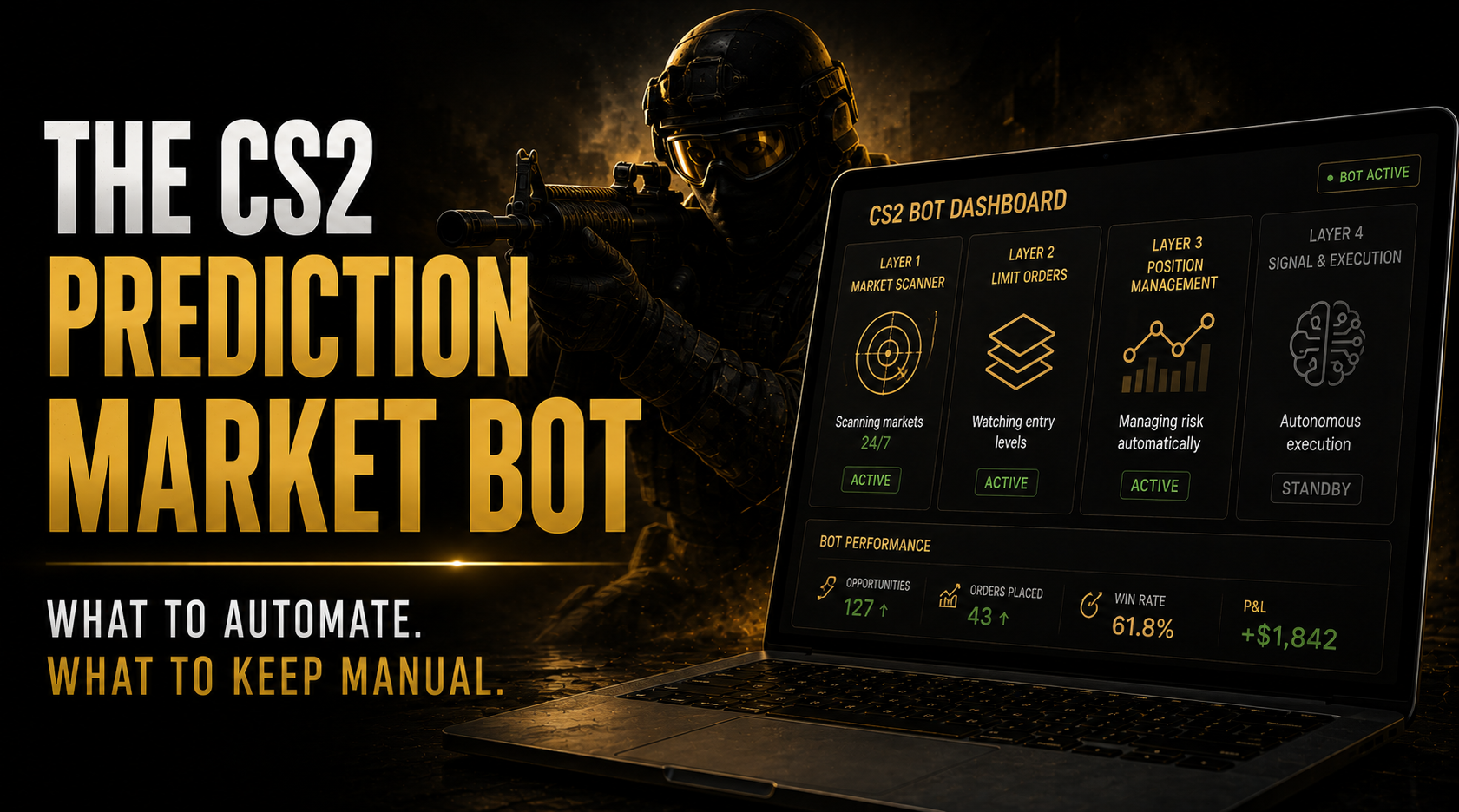
The CS2 Prediction Market Bot Guide: What to Automate, What to Keep Manual
The first thing most traders want to automate is the execution. That’s usually the last thing that actually needs automating.
A cs2 prediction market bot that correctly places orders programmatically doesn’t solve the real bottleneck in most CS2 trading workflows. The real bottleneck is information delivery, getting the right signal to the right decision quickly enough. Automation helps in different places for different traders, and understanding which places depend entirely on where your workflow currently loses time.
This guide covers what’s technically possible with the Polymarket CLOB API, what’s worth automating for most CS2 prediction market traders, and, critically, what shouldn’t be automated until you have the research track record to justify it.
Table of Contents
What Polymarket Actually Allows
Building a cs2 prediction market bot starts with understanding what Polymarket actually allows. Programmatic access via the CLOB API is permitted under Polymarket’s terms of service. The API is public, documented, and used by market makers and quantitative traders on the platform. There’s no separate approval process or enhanced verification requirement for API access.
The relevant API endpoints for a cs2 prediction market bot:
Market data endpoints: Return current YES/NO prices, order book depth at each price level, recent trade history, and market metadata including resolution criteria and expiry date. Polling these at 30-60 second intervals gives a bot the live price feed needed for threshold monitoring. Polymarket doesn’t impose strict rate limits on read endpoints.
Order management endpoints: Place limit GTC orders, limit GTD orders, and market orders. Cancel existing orders. Limit GTC orders placed via API behave identically to those placed through the Polymarket interface, they sit in the CLOB until filled or cancelled. Authentication requires a signed wallet transaction, which Python’s web3 library handles this in approximately 15 lines of code.
Portfolio endpoints: Return current open positions, resolved position history, and current USDC balance. These are what a position management automation layer uses to monitor whether a stop-loss threshold has been crossed.
The geographic restriction applies to API access too. US-based traders cannot use Polymarket via API for trading any more than they can through the interface. The API doesn’t provide a regulatory workaround.
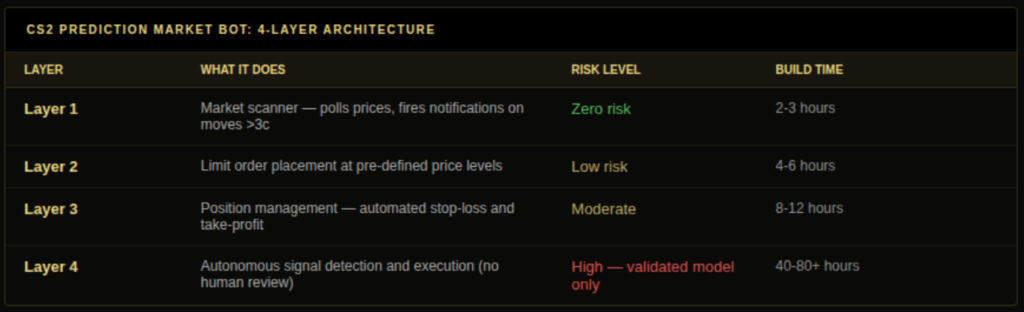
The CS2 Prediction Market Bot Four-Layer Architecture
A cs2 prediction market bot doesn’t need to be all-or-nothing. Building it as four separate layers, each with a different risk profile, lets you deploy the safe components immediately and defer the risky components until you have the research record to justify them.
Layer 1, Market scanner (zero risk, build first) Polls CS2 Polymarket market prices every 60 seconds. Compares each market’s current devigged price against the previous check. Fires a notification when any market moves more than a defined threshold. No order placement. No connection to your wallet. Zero financial risk. This is monitoring infrastructure, not trading automation.
Estimated build time with basic Python: 2-3 hours. Value: immediate. This layer alone replaces the need to manually refresh Polymarket pages during match windows.
Layer 2, Limit order placement (low risk, build second) Accepts pre-researched entry parameters you’ve defined manually, market ID, outcome, target price, position size, and places a limit GTC order at the specified price when triggered. The key: all parameters are set by you in advance based on your research. The bot executes your decision, it doesn’t make one.
This is the equivalent of setting a conditional order at a brokerage. You’ve done the research, you know your entry level, and the bot watches for the price to reach that level while you’re doing something else. No autonomous decision-making required.
Layer 3, Position management (moderate risk, build third) Monitors open CS2 positions against stop-loss and take-profit thresholds. Places automated sell orders when those thresholds are crossed. This removes the need to watch positions continuously during live matches. The risk is in the implementation, if the API polling fails silently during a network interruption, your stop-loss doesn’t fire. Build explicit error handling and fallback notifications before trusting this layer with real positions.
Layer 4, Signal detection and autonomous execution (high risk, only with validated model) Detects lineup change signals (from social media monitoring or price velocity), runs your model, and places orders without human review. This is the fully autonomous cs2 prediction market bot. It requires a validated model with 100+ out-of-sample positions and documented positive CLV before deployment. Without that validation, this layer turns your bot into a mechanism for losing money faster than you could manually.
DG3 as an Alternative to Layers 1-3
Before building Layers 1-3 as a custom cs2 prediction market bot, evaluate whether DG3 already covers them.
Layer 1 equivalent, DG3 Edge Finder: Provides continuous EV gap ranking across all active CS2 Polymarket markets in real time. Markets that reprice rapidly rise in the ranking. You don’t need a polling script to notice that a market has moved, the Edge Finder surface change is immediate and visible.
Layer 2 equivalent, DG3 1-Click Trade: Compresses the decision-to-submitted-order workflow to under 2 seconds. This doesn’t automate the decision, it accelerates the execution of a decision you’ve made. For the typical CS2 edge window of 12-25 minutes, the difference between 2 seconds and 12 seconds of order form friction is meaningful.
Layer 3 equivalent, partially covered: DG3 doesn’t currently automate stop-losses on open positions. For position management automation, a minimal Polymarket API script is still the most practical approach.
The practical implication: most CS2 prediction market traders don’t need a custom bot for Layers 1-2. DG3 covers them. The build case for a cs2 prediction market bot is strongest for Layer 3 (position management) and Layer 4 (if you have the validated model to justify it).
Also read: Automating Polymarket Trades: What Is Possible, Allowed, and Breaks
The Autonomous Execution Layer: Conditions for Deployment
Layer 4, autonomous signal detection and execution, is where cs2 prediction market bot building gets genuinely dangerous and genuinely valuable simultaneously. The conditions that justify deploying it:
Condition 1: 100+ out-of-sample positions with documented positive CLV. Not 100 positions total. 100 positions in the specific market type the bot will trade, on data the model hasn’t seen. The distinction between in-sample and out-of-sample validation is covered in the CS2 backtesting guide. Below this threshold, you’re deploying an unproven system on real capital.
Condition 2: False positive rate below 5% on your signal detection. If your stand-in detection NLP triggers on 5% incorrect detections (historical references, fan speculation, non-lineup news), that’s 1 incorrect execution in 20 signal events. At typical CS2 position sizes, the cost of incorrect executions can exceed the gains from correct ones. Test your detection accuracy on historical social media data before connecting it to execution.
Condition 3: Slippage model included in position sizing. A bot that sizes positions using Kelly fractions without accounting for execution slippage will consistently over-size. On a 14-minute stand-in window, the price you actually fill at is 1-3 cents worse than the signal price. Build this into your expected return calculation before the bot places any order.
Condition 4: Circuit breaker implemented. A maximum daily loss limit that shuts the bot down automatically. A maximum number of positions per day. A manual override that you can activate in under 30 seconds from a mobile device. Without circuit breakers, a bot running on a misconfigured model during a match day with multiple stand-in announcements can enter 8 positions in 40 minutes. That’s not a hypothetical.
Common CS2 Prediction Market Bot Implementation Errors
Every error listed here has been documented in real deployments, not hypothetical scenarios. They’re the four that appear most frequently because they each follow from a logical misunderstanding about the relationship between execution automation and edge generation.
Error 1: Building Layer 4 before Layer 1. Start with the market scanner. It has zero risk and teaches you how the Polymarket API actually behaves in production, rate limits, response latency, occasional data gaps. This knowledge is essential for building reliable higher layers.
Error 2: Using test data to validate the signal detection and training data to validate the model. These are two distinct validation problems requiring two distinct datasets. Your NLP needs to be tested on historical social media posts your model hasn’t seen. Your model needs to be tested on historical match data your parameter optimisation hasn’t seen. Conflating them produces overfitted garbage.
Error 3: Ignoring gas costs and API latency. Polymarket runs on Polygon. Gas costs per transaction are fractions of a cent, not a meaningful constraint. API order confirmation latency typically runs 500ms-2 seconds. On a 12-minute stand-in window, this is acceptable. On a 3-minute in-play momentum signal, 2 seconds of latency is a notable portion of the window. Match your bot’s latency requirements to the edge window of the strategy it’s executing.
Error 4: No monitoring of the bot’s activity during live sessions. A cs2 prediction market bot should be supervised closely during the first 20-30 live sessions across multiple match days before running unsupervised during any major event window, not running unsupervised from deployment day one. Anomalies appear in live execution that don’t appear in testing. Run the bot with notifications enabled for every order it places and review them in real time until you’re confident in its behaviour.
The cs2 Prediction Market Bot Economics: When Does Building One Make Sense?
Building a cs2 prediction market bot is a time investment. Understanding the economics of that investment prevents both underbuilding (missing automation that would materially improve returns) and overbuilding (spending 40 hours automating a task that adds $15 of value per month).
Layer 1 (market scanner): 2-3 hours to build, zero financial cost, provides immediate value as monitoring infrastructure for anyone trading CS2 actively. Clear positive economics for any trader placing more than 5 CS2 positions per month.
Layer 2 (limit order placement): 4-6 hours to build, negligible API cost. Value depends on how often you’re placing positions at non-current prices versus current prices. If you primarily enter on stand-in signals (requiring fast current-price execution), Layer 2 adds less value than DG3’s 1-Click Trade covers. If you frequently place limit orders at specific price levels and want them monitored passively, Layer 2 is valuable.
Layer 3 (position management): 8-12 hours to build, requires careful error handling. Value is in removing the need to monitor open positions continuously during live matches. For traders with day jobs or other commitments during CS2 match windows, this is potentially the highest-value layer despite building third.
Layer 4 (autonomous execution): 40-80+ hours to build correctly (including signal detection, false positive testing, and validation), plus ongoing monitoring. Only economically justified with a documented, validated edge that produces returns large enough to justify the capital risk of automation.
Testing a CS2 Prediction Market Bot Before Live Deployment
The cs2 prediction market bot testing framework needs to cover technical behaviour (does the bot do what the code says?) and strategy behaviour (does the strategy the bot implements produce the expected results?). These are different tests requiring different approaches.
Technical testing: run the bot in paper trading mode, real API calls to monitor prices and log simulated orders, but no actual order submission to the Polymarket CLOB. This verifies that price monitoring logic works, notification triggers fire correctly, order parameters are calculated correctly, and error handling catches API failures gracefully. Run paper trading for at least 10-15 signal events before enabling live order placement.
Strategy testing: this is the backtesting work described in the CS2 backtesting guide. Before automating a strategy, validate it on historical data. A bot running an unvalidated strategy executes losing trades faster and more consistently than a human running the same strategy manually. Automation magnifies both the value of good strategies and the losses from bad ones.
Stress testing: run the bot during a simulated high-frequency scenario, multiple stands-in announcements in a single session, format changes mid-tournament, rapid market movements. These scenarios don’t occur every event but they do occur, and the bot’s behaviour in them needs to be understood before it’s managing real capital.
Frequently Asked Questions
Q: How do you build a CS2 prediction market bot on Polymarket? A: Via the Polymarket CLOB API using market data, order management, and portfolio endpoints. Build in order of risk and value: Layer 1 (market scanner, zero risk) first, Layer 2 (limit order placement, low risk) second, Layer 3 (position management automation, moderate risk) third, and Layer 4 (autonomous signal detection and execution, high risk) only with 100+ out-of-sample validated positions behind your model. Python with the Polymarket API client and web3 library for wallet authentication is the standard implementation stack. For most CS2 traders, DG3 covers Layers 1-2 already and the build case is strongest for Layer 3 position management automation, which DG3 doesn’t currently replicate. using market data, order management, and portfolio endpoints. Build in order of risk: market scanner first (zero risk), limit order placement second (low risk), position management third (moderate risk), autonomous signal detection and execution last (only with 100+ out-of-sample validated positions).
Q: Is automated CS2 trading allowed on Polymarket for a cs2 prediction market bot? A: Yes. Polymarket’s terms of service permit programmatic API access and order placement. The API is public and used by market makers. Geographic restrictions apply to API access the same as to interface access, US traders cannot use Polymarket via API for trading.
Q: What Python libraries do you need for a Polymarket CS2 bot? A: The Polymarket API client (available on PyPI), web3 for wallet authentication, requests for API calls, and pandas for data handling. For Layer 4 signal detection, additional NLP libraries (transformers, or simpler regex approaches for keyword matching) depending on implementation complexity.
Q: Why shouldn’t you automate CS2 execution without a validated model? A: Because automation makes errors faster and more consistent. A human trader making a bad call loses once. An autonomous system with a flawed model executes the same flawed logic on every signal event it detects, potentially placing 8-10 incorrect positions in a single session. The model validation requirement for any cs2 prediction market bot isn’t about technical capability, it’s about having demonstrated edge before deploying capital on it automatically.
Q: How does DG3 reduce the need for a custom cs2 prediction market bot? A: DG3 covers the highest-value automation use cases for most traders: Edge Finder provides continuous market monitoring (Layer 1 equivalent), 1-Click Trade provides sub-2-second execution (Layer 2 equivalent), and the Intelligence Pane aggregates signal context that would otherwise require multiple monitoring systems. The remaining automation gap is position management (Layer 3), which a minimal API script handles.
Also read: The Polymarket API: What Data You Can Pull and What to Build With It
CS2 Prediction Market Alerts: How to Never Miss a Line Move
CS2 Prediction Markets: The Complete Guide for Traders in 2026