Automating Polymarket Trades: What Is Possible, Allowed, and Breaks
The edge closes before you can act on it. You know this because it has happened to you at least once: the price was right, the position was clear, and by the time the order was placed, the market had moved past the threshold. Automation solves this problem. Automation also creates new problems that take down more accounts and bankrolls than the original problem ever did.
Understanding exactly what is technically possible, what Polymarket permits, and where automated systems break in practice is the difference between a tool that extends your trading capability and one that quietly executes wrong trades at Polygon gas cost while you sleep.
Table of Contents
Quick Answer
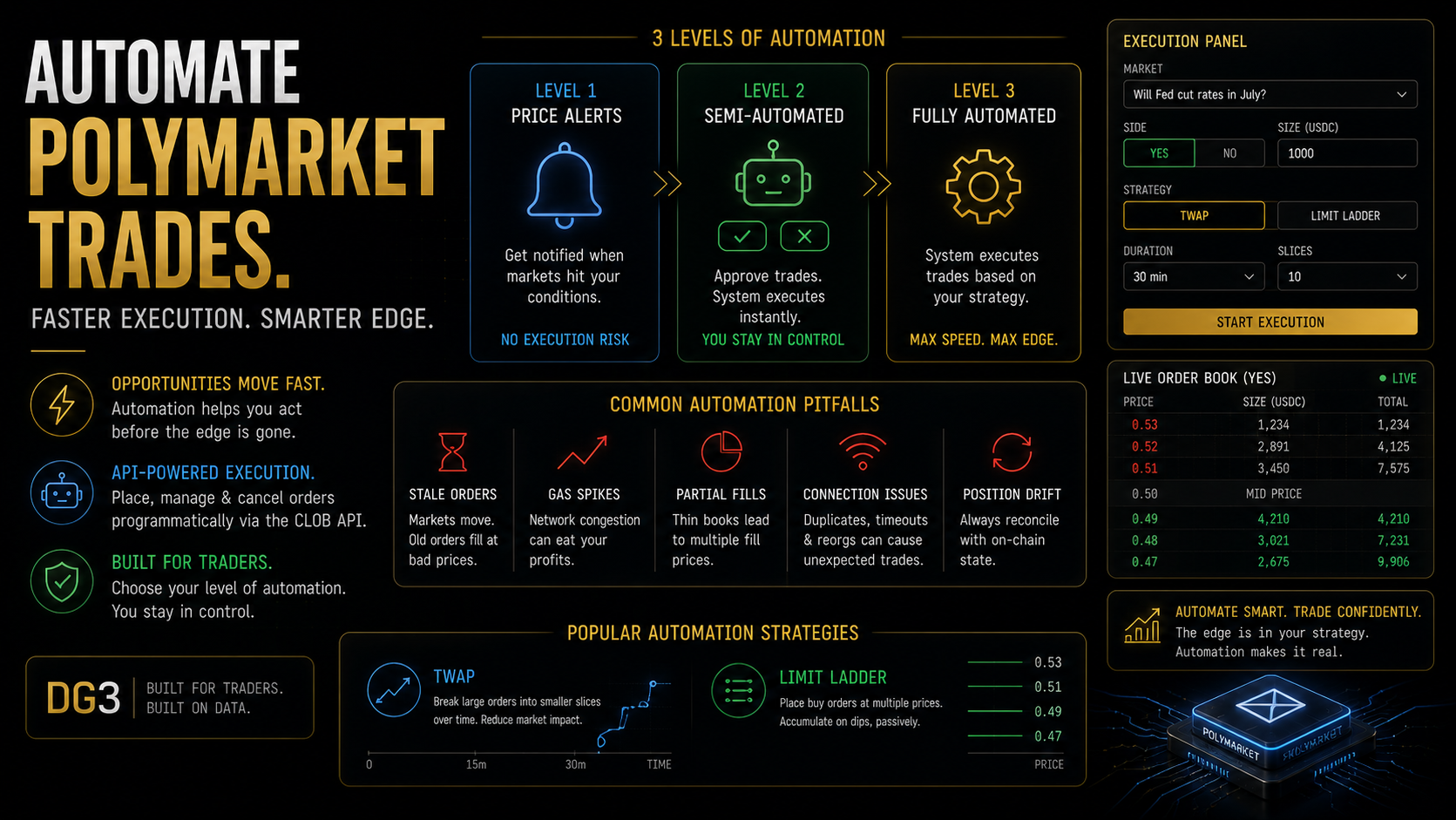
Automated trading on Polymarket is technically possible and permitted under its terms of service. The CLOB API supports programmatic order placement and cancellation via wallet authentication. Three practical automation levels exist: price alerts (no execution), semi-automated limit order placement (you approve, system executes), and fully automated execution (system acts without human approval). Each level has different technical complexity, different failure modes, and a different risk of silent errors. Gas costs on Polygon accumulate with every transaction and are often the deciding factor in whether a low-edge automated strategy is profitable.
Key Takeaways
- Polymarket does not prohibit automated trading. The CLOB API is documented, publicly accessible, and specifically designed for programmatic order placement. Using bots on Polymarket is allowed.
- The CLOB API executes trades on-chain via Polygon. Every order placement is a blockchain transaction. This means gas costs accumulate with every trade, partial fills happen when order book depth is insufficient, and network congestion affects execution timing. These are not edge cases. They are routine parts of operating an automated Polymarket system.
- Three automation levels correspond to three distinct risk profiles. Price alerts carry no execution risk. Semi-automated systems carry human-approval risk (you must be available to confirm). Fully automated systems carry silent error risk – the system can execute incorrect trades without your knowledge while you are unavailable.
- The most common failure mode in automated Polymarket execution is stale limit orders. An order placed at a price that was valid when submitted may sit in the order book after the market has moved, getting filled at a price that no longer reflects a positive edge position.
- TWAP (Time-Weighted Average Price) execution and limit laddering are two structured execution strategies that work well on Polymarket for large position entry. Both are available as configurable options in DG3’s Execution Panel without requiring custom code.
- Before deploying any automated execution system, simulate it on a small bankroll for at least two weeks. The failure modes are not visible in backtests. They appear in live conditions when network latency, partial fills, and stale orders interact in ways the simulation never modelled.
What Automation Is Allowed on Polymarket
Polymarket’s terms of service permit automated trading. The CLOB API is explicitly provided for programmatic access, and Polymarket’s documentation includes developer guides for building on top of it.
This distinguishes Polymarket from traditional sportsbooks, which routinely restrict or ban accounts that use automation, and from some other prediction market platforms with more restrictive API terms. On Polymarket, building a bot is not a terms violation. Running a bot that happens to create advantageous trades is also not a violation. The platform is designed for it.
What is not permitted: exploiting bugs in smart contracts, front-running other users through privileged access to infrastructure, or activities that constitute market manipulation under applicable law. Standard algorithmic trading – placing and cancelling orders based on market conditions – is not in these categories.
The 3 Levels of Polymarket Automation
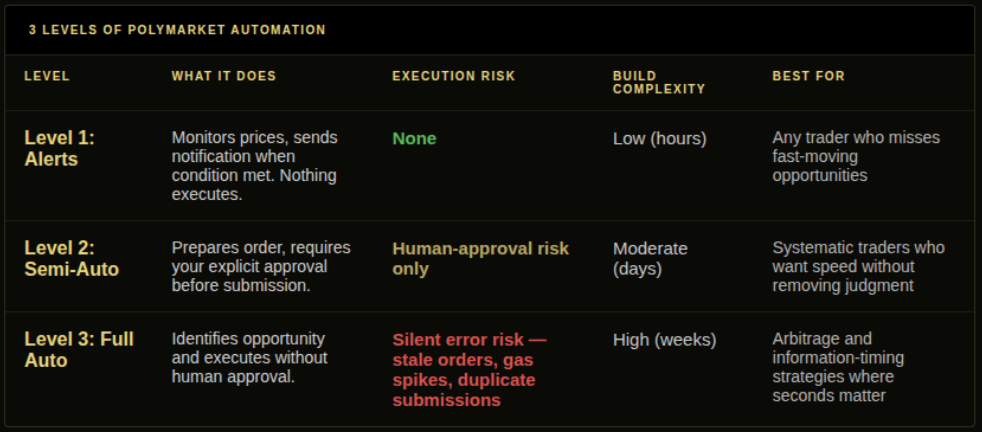
Level 1: Price alerts (no execution risk).
The simplest and safest form of automation. A system monitors Polymarket market prices through the Gamma API and sends you a notification when a defined condition is met: a price crosses a threshold, a market moves more than X cents in Y minutes, or a categorical market’s YES price sum falls below 1.00.
Nothing executes. The alert is information, and you decide what to do with it. This level solves the problem of missing fast-moving opportunities by keeping you informed, without the risk of automated execution acting incorrectly.
Build complexity: low. A Python script using requests to poll the Gamma API every 30-60 seconds and a notification service (Telegram bot, email, SMS) is sufficient.
Level 2: Semi-automated execution.
A system identifies a trading opportunity and prepares an order, but requires your explicit approval before submitting it to the CLOB API. You receive an alert with the proposed trade parameters (market, direction, price, size) and confirm or reject it via a simple interface (a Telegram command, a web dashboard button, a mobile notification).
This adds execution speed without removing human judgment. The system handles market monitoring and order preparation. You handle the go/no-go decision. If you are unavailable to approve, the order does not execute.
Build complexity: moderate. Requires the Gamma API for monitoring, the CLOB API for execution, wallet authentication, and a confirmation interface. A Telegram bot with inline keyboard buttons for approve/reject is a common implementation.
Level 3: Fully automated execution.
A system identifies opportunities and executes orders without human approval. This is appropriate for strategies where execution speed is critical (arbitrage, information timing edges) and where the strategy logic is reliable enough to operate without supervision.
The risks here are qualitatively different from Level 2. Silent errors are the central concern. A stale limit order in an illiquid market. A gas price spike that changes the economics of a trade. A market that resolves unexpectedly and leaves open orders against a no-longer-valid thesis. A network issue that creates duplicate order submissions. None of these appear in backtests. All of them happen in production.
Build complexity: high. Requires the full CLOB API implementation, proper error handling, order state management, gas price monitoring, position reconciliation against on-chain state, and monitoring infrastructure to alert you when the system behaves unexpectedly.
What Breaks in Automated Polymarket Trading
This section is the reason most automation projects fail in practice when they appeared to work in testing.
Stale limit orders.
You place a YES limit order at 0.52 based on your edge model. The market moves to 0.58 over the next 20 minutes, driven by news you have not processed yet. Your limit order fills at 0.52, but at 0.52, the market is now pricing a different underlying probability. You have entered a position at a price that reflected pre-news conditions. The order was placed correctly at the time. The fill happened at a price that no longer reflects the original edge thesis.
Cancel and re-evaluate any unfilled limit order after a defined period: 2-5 minutes on fast-moving markets, longer on slow ones. Orders that age past this threshold should be pulled and re-priced before resubmission.
Gas price spikes.
Polygon gas is cheap and usually stable. Occasionally it is not. A system that assumes $0.01 gas per transaction will misbehave during congestion spikes when gas costs 10-20x normal. For low-margin strategies (1-3 cent edge), a gas spike can flip an entire execution session from profitable to unprofitable.
Add a gas price check before each transaction. Set a ceiling above which the system pauses execution rather than proceeding at the higher cost. The Gas-Aware Betting article covers how to model this threshold.
Partial fills.
Your system places a $500 YES order on a market with $2,000 in liquidity. The order fills $180 at 0.52 and the remaining $320 partially fills at 0.54 and 0.56 as it moves through the order book. Your system needs to track the actual fill prices across multiple transactions, calculate the weighted average entry price, and update the edge model accordingly.
Track each partial fill separately and calculate a position-level weighted average cost. A single limit order on a thin book can fill in three tranches at three different prices. The system needs to handle all three.
Network connectivity issues.
A transaction submission times out. The system does not know whether the transaction was included in a block or dropped. It submits again. Both submissions get included. You now hold twice the intended position at double the intended capital deployment.
Check on-chain state before re-submitting any timed-out transaction. Idempotent submission logic (verifying a transaction was not already included before sending again) is the most technically demanding failure mode to handle correctly.
Position drift without reconciliation.
Over time, your system’s internal model of what positions you hold diverges from the actual on-chain state. Open orders, partial fills, and resolved markets accumulate discrepancies. The system operates on incorrect assumptions about your current portfolio.
Reconcile the internal position model against on-chain state at minimum once per hour, or before any execution decision that depends on current portfolio. This check catches drift before it compounds into incorrect sizing decisions.
TWAP and Limit Laddering Without Custom Code
For traders who want structured execution without building a custom system, two strategies, TWAP and limit laddering, are available as configurable options in DG3’s Execution Panel.
TWAP (Time-Weighted Average Price): Breaks a large intended position into smaller orders spread across a defined time window. Instead of entering $2,000 YES in one order (which would move a thin market’s price), TWAP enters $200 every few minutes across 10 intervals. The average fill price tracks the time-weighted midpoint over the entry window, reducing price impact on thin markets.
Limit Ladder: Places a series of limit orders at descending prices below the current market. If a market is at 0.55 and you want to accumulate YES on any dip, a limit ladder places orders at 0.53, 0.51, and 0.49. As the market moves through these levels, your orders fill progressively. This is a passive accumulation strategy that works on markets where you have a directional view over a longer horizon.
Both are configured through DG3’s interface rather than custom code, which eliminates the failure modes associated with building execution infrastructure from scratch.
Common Mistakes
Mistake 1: Deploying a fully automated system on a live bankroll before extended simulation. The failure modes described above are not visible in paper trading or backtesting. They appear in production when the combination of network latency, market depth, gas fluctuation, and partial fills interact in real conditions. Simulate on a very small bankroll ($50-100) for at least two weeks before deploying any capital that matters. The simulation will reveal failure modes the backtest missed.
Mistake 2: Not implementing maximum order age. Stale limit orders are the most expensive single failure mode in automated Polymarket trading. An order placed on valid thesis that fills on an invalidated thesis is not a slippage event. It is a position in the wrong direction at the wrong price. Every automated system must have a defined maximum order age after which unfilled orders are cancelled and re-evaluated.
Mistake 3: Ignoring gas accumulation in profit calculations. Every order placement, cancellation, and partial-fill update is a separate Polygon transaction. An active automated system on a thin market making 50-100 order interactions per day is paying gas on each one. Model the gas cost explicitly in your strategy economics before deployment. What looked like a 3-cent edge on the backtest may be a 1-cent net edge after gas.
Mistake 4: Building without on-chain reconciliation. Your system’s internal position model will drift from on-chain reality over time. Without periodic reconciliation, the system makes execution decisions based on wrong assumptions about what it currently holds. This is not a rare edge case. It is a predictable consequence of operating in an async on-chain environment without explicit state verification.
Mistake 5: Treating all markets as equally suitable for automation. Automated execution works best on liquid markets with predictable order book depth. On thin markets with wide spreads, automated limit order placement is more likely to create stale orders at prices that no longer reflect valid edge than to execute the intended strategy. Screen markets by liquidity before including them in any automated execution strategy.
Structured Execution Without Custom Infrastructure
DG3’s Trade Desk supports Limit GTC and Limit GTD orders, which enable placing multiple price levels across separate tickets, achieving the laddering effect without custom code. The GTD expiry picker controls how long each level rests in the book. For time-distributed entry, placing Limit GTC orders in increments over a defined window produces the same result as TWAP without requiring a custom execution system.
For developers building custom systems on top of the Polymarket API, the Polymarket API guide covers the specific endpoints, WebSocket feeds, and authentication requirements for the CLOB layer.
Frequently Asked Questions
Q: Can you use bots on Polymarket? A: Yes. Polymarket permits automated trading. The CLOB API is explicitly provided for programmatic access and the documentation includes developer guides. Using bots on Polymarket is not a terms of service violation. Standard algorithmic trading, placing and cancelling orders based on market conditions, is permitted.
Q: Is Polymarket automation allowed? A: Yes. Polymarket’s terms of service permit programmatic trading through the CLOB API. Prohibited activities are those involving exploitation of smart contract bugs, market manipulation, or front-running via privileged infrastructure access. Algorithmic trading based on market data is not in these categories.
Q: How do you automate limit orders on Polymarket? A: Use the CLOB API with wallet authentication for write operations. The API accepts order placement requests with market ID, direction (YES or NO), price, and size. Orders are submitted as signed transactions from your wallet. Partial fills are returned in the fill response. Cancelled orders require a separate cancellation request. Python users can use the py-clob-client library for the CLOB API interactions.
Q: What breaks when you automate Polymarket trades? A: Five primary failure modes: stale limit orders that fill after the edge thesis is invalidated, gas price spikes that make low-edge trades unprofitable, partial fills that create position tracking complexity, network connectivity issues that produce duplicate order submissions, and position drift between the system’s internal model and on-chain state. Each requires explicit handling in production systems.
Q: How does DG3 automate execution without custom code? A: DG3’s Trade Desk supports Limit GTC and Limit GTD orders with configurable expiry, enabling a laddering approach across multiple price levels without custom code. TWAP breaks large positions into time-distributed smaller orders to reduce price impact on thin markets. Limit laddering places descending buy orders at defined price intervals for passive accumulation. Both strategies run through DG3’s execution infrastructure rather than requiring custom API integration.
Q: Can I build a trading bot for Polymarket in Python? A: Yes. Polymarket’s py-clob-client library provides a wrapper around the CLOB API for execution. For read operations (monitoring prices, pulling order book data), no authentication is required. For write operations (placing and cancelling orders), you authenticate with your Polymarket wallet. Add proper error handling, order age limits, gas price monitoring, and on-chain position reconciliation before deploying on a real bankroll.
Q: What is TWAP execution on Polymarket? A: TWAP (Time-Weighted Average Price) breaks a large intended position into smaller orders spread across a time window. Instead of entering the full intended size in one order (which moves price on thin markets), TWAP enters a fraction of the total at defined intervals. The result is an average fill price that tracks the time-weighted midpoint over the entry window, reducing slippage on markets without deep liquidity.
Q: What are the gas costs of automated Polymarket trading? A: Each order placement and cancellation is a Polygon blockchain transaction with gas cost. At normal Polygon gas prices, each transaction costs fractions of a cent. An active system placing and cancelling 50-100 orders per day might pay $0.05-$0.50 in total gas. During congestion spikes, costs can be 10-20x higher. Low-edge automated strategies must model gas costs explicitly, as they can consume the entire margin on thin-edge trades.
Final Thoughts
Automation on Polymarket is not a shortcut to edge. It is a tool that lets you express existing edge faster and more consistently than manual trading allows. Without genuine edge in the strategy it executes, automation produces losses faster and more efficiently than manual trading does.
The three levels of automation represent a spectrum of commitment and complexity. Start at Level 1. Run price alerts for a month. See what opportunities you are identifying and how fast they close. That data tells you whether Level 2 or Level 3 automation is worth the engineering investment.
Most traders who build automated Polymarket systems get returns from Level 1 and Level 2. Level 3 is necessary for strategies where execution latency is the binding constraint, arbitrage, information timing edges measured in seconds. For most systematic prediction market approaches, the edge is in the probability estimation, not the execution speed. Better estimates beat faster execution in those strategies.
Build for the level you need. Not for the one that sounds most impressive.
Sign up now – DG3 Terminal
Also read:
The Polymarket API: What Data You Can Pull and What to Build With It
Gas-Aware Betting
The Best Polymarket Tools in 2026: What Serious Traders Are Actually Using