Kalshi API: The Developer Guide to Data, Orders and Limits
You pull up the Kalshi API for the first time expecting something like Stripe. A key, a header, done.
Instead your first authenticated call comes back 401. There’s no simple bearer token here. Every private request needs a cryptographic signature, and Kalshi’s own API documentation assumes you already know what that means.
This is the guide for the version of you from ten minutes ago. Auth, the endpoints that actually matter, and the rate limit model that will throttle you if you build against the wrong assumptions.
Table of Contents
Quick Answer
The Kalshi API is a REST and WebSocket interface for pulling market data and placing orders on Kalshi’s markets, regulated by the Commodity Futures Trading Commission (CFTC). Reading market data, series, events, prices, and the order book needs no authentication at all. Placing orders, checking your portfolio, or managing positions requires an API key pair and a signed request. Kalshi API rate limits run on a token-bucket model. A free Basic account starts at 200 read and 100 write tokens per second, scaling up with trading volume.
Key Takeaways
- Market data is public. You can pull series, events, market prices, and the order book with zero authentication, no API key needed.
- Trading is not public. Every authenticated request needs an RSA-PSS signature. You build it from a timestamp, HTTP method, and request path, then attach it as three headers.
- There’s no password-style login for the API. You generate a key pair once, upload the public half, and keep the private key on your own machine.
- Rate limits are token buckets, not fixed per-second counters. Most requests cost 10 tokens, so your sustained rate is your tier’s budget divided by 10.
- A free Basic account gets you 200 read tokens and 100 write tokens per second. That’s roughly 10 orders per second sustained, more in a short burst.
- Higher tiers aren’t something you buy. Your trading volume earns them automatically, or Kalshi assigns one directly.
- There’s no separate Kalshi API pricing tier to worry about. Kalshi fees apply the same way whether you trade through the app, the website, or the API.
Getting Access: Keys, Not Passwords
Kalshi doesn’t charge for API access itself. You still pay the normal per-trade fee on anything the API executes, same as trading through the website.
Generate your credentials from your account settings at kalshi.com. Kalshi gives you an API key ID and an RSA private key file. Store that private key the way you’d store any signing credential: out of version control, out of client-side code, in a secrets manager if this is going anywhere near production.
There’s a demo environment worth using before any of this touches real money. Kalshi runs a separate demo host with its own credentials, so a key pair from your live account won’t work there and vice versa. Build and break things there first.
Developers often land on this page already deep in the kalshi vs polymarket (or polymarket vs kalshi) research trail, and the API layer is where that comparison gets concrete. Kalshi’s RSA signing is a different mental model entirely from Polymarket’s wallet-based API. If you’re still scoping out kalshi alternatives or kalshi competitors more broadly, the fuller platform comparison and where each prediction market platform fits both cover the non-technical side of that decision. For anyone running kalshi and polymarket accounts side by side, the auth model is one more asset to budget engineering time around.
Authentication: Signing Every Private Request
This is the part that trips up almost everyone coming from a simpler API. There’s no Authorization: Bearer header. Instead, you sign each request yourself.
- Build the message. Concatenate the current millisecond timestamp, the HTTP method in uppercase, and the request path, in that exact order. The path includes the API version prefix but never the query string. A GET to
/trade-api/v2/portfolio/orders?limit=5signs/trade-api/v2/portfolio/orders, not the part after the question mark. - Sign it. Use RSA-PSS with SHA-256 for both the hash and the MGF1 function, and a salt length equal to the digest length. Your private key does this, never the public one.
- Encode the signature as base64, then attach three headers to the request:
KALSHI-ACCESS-KEY(your key ID),KALSHI-ACCESS-TIMESTAMP(the same millisecond timestamp you signed), andKALSHI-ACCESS-SIGNATURE(the base64 signature). - Send it. If any piece doesn’t match, the wrong timestamp, a query string left in the signed path by mistake, a stale clock, you get a 401 with no hint about which piece was wrong. Clock drift between your machine and Kalshi’s server is a common, quiet cause of this.
Public endpoints skip all four steps entirely. Pulling market prices, series data, or the order book needs no key, no signature, nothing. Save the cryptography for the moment you actually need to place, cancel, or check an order.
The Endpoints That Actually Matter
Kalshi’s surface is smaller than it looks once you group it by what you’re actually trying to do, a pattern common across prediction market platforms generally.
Public market data (no auth): series, events, markets, and the order book. This is where a research tool or a market-pricing script lives entirely. Kalshi expresses every price as a whole number of cents from 1 to 99, where the number is the market’s implied probability. A YES price of 62 means the market prices that outcome at roughly 62 percent. What some people call Kalshi odds are really just cents-denominated probabilities, not sportsbook-style odds.
Authenticated portfolio data: your balance, open positions, order history, and fills. Read-only, but still signed, since it’s account-specific.
Order management: creating, canceling, and amending orders, plus batch versions of both. This is the part billed against your write budget, and the only part that moves real money.
WebSocket streams: live order book deltas, trades, and ticker updates over a single connection. Worth knowing: the WebSocket connection itself needs authentication, even for channels that only carry public data. That catches people who assume public means unauthenticated everywhere.
Rate Limits: How the Token Bucket Actually Works
Every authenticated request costs tokens, not “one request.” Most cost 10. Your tier sets a budget, refilled steadily every second, and your sustained request rate is roughly that budget divided by the per-request cost.
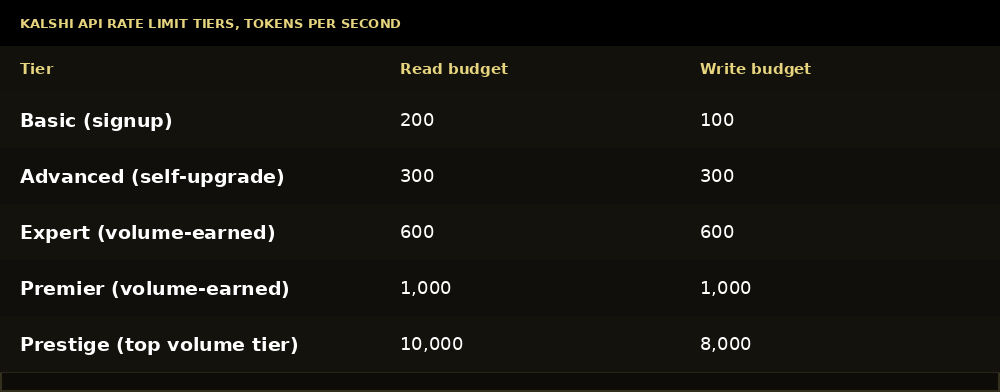
At the default 10-token cost, a Basic account sustains roughly 10 orders per second, before accounting for burst capacity. Advanced is a self-service upgrade through an API call. Everything above that, Expert through Prestige, your trailing 30-day trading volume earns automatically. Kalshi reviews it once a day; you can’t request a tier directly.
Buckets also allow bursting. Most tiers bank up to two seconds of unspent budget, so a client that sits idle and then fires a block of orders when a market moves gets more headroom than the steady-state number suggests.
Hit the limit and you get a plain 429 Too Many Requests, no retry-after header, no cooldown period. The bucket is already refilling by the time you see the error. Exponential backoff on 429 is the correct response, not a longer wait than necessary and not an immediate retry either.
Rate limit: A cap on how many requests, or in Kalshi’s case tokens, an API account can spend per second before Kalshi starts rejecting requests. Batch endpoints don’t get a discount. Submitting 25 orders in one batch call costs the same 250 tokens as 25 individual calls. The batch needs that full budget available up front, or Kalshi rejects the entire batch.
Kalshi fees on limit orders work the same regardless of whether you place them through the website or the API. The API doesn’t change what you’re charged, only how fast you can submit orders.
Common Mistakes
Assuming a simple API key header exists. It doesn’t. Every authenticated call needs the full RSA-PSS signing flow. Trying to bolt a Kalshi key onto code written for a Bearer-token API will fail immediately and unhelpfully.
Signing the path with the query string still attached. The signature only covers the path up to the question mark. Leave the query string in your signed message and you’ll get a 401 that gives no clue why.
Building against production credentials in the demo environment, or vice versa. Demo and live are separate hosts with separate key pairs. A key generated for one will not authenticate against the other.
Treating your rate limit as a fixed per-second cap. It’s a token bucket with burst capacity, not a strict counter. Code that backs off too cautiously leaves real throughput on the table, especially right after idle periods.
Ignoring clock drift. The signed timestamp has to sit close to Kalshi’s server time. A client clock that’s meaningfully off can cause signature failures that look like a signing bug when the actual problem is time sync.
Frequently Asked Questions
Q: Is the Kalshi API free? A: Yes, there’s no charge for API access itself. Kalshi fees apply on any position the API places, the same fees you’d pay trading through the website.
Q: Is Kalshi legit? A: Kalshi is a CFTC-designated contract market, which is a specific, regulated status under US commodities law, not a self-declared claim. That’s a different category from a platform that isn’t regulated at all.
Q: What is Kalshi? A: Kalshi is a CFTC-regulated exchange where each Kalshi prediction market settles based on the outcome of a real-world event, from economic data to weather to political results, with prices expressed as cents representing implied probability.
Q: Is Kalshi gambling, or is it more like Kalshi betting? A: Neither, officially. People often search “Kalshi betting,” “Kalshi betting app,” or “Kalshi betting odds,” but the CFTC regulates Kalshi as a commodities exchange trading event contracts; no regulator licenses or categorizes it as a gambling product. Whether a given contract feels more like trading or wagering depends on the event, but its category is exchange-traded derivatives, a different bucket from a traditional sportsbook.
Q: How do I trade weather and other Kalshi live forecast markets through the API? A: The same way as any other series. Query the events endpoint for the weather series you want, pull its markets and current order book with a public, unauthenticated call, then place orders against a specific market ticker through the authenticated order endpoint like any other contract.
Q: What does the Kalshi API cost beyond trading fees? A: Nothing beyond your rate limit tier. There’s no separate Kalshi API pricing or subscription, and Basic tier access comes automatically with account signup.
Q: How do I get a Kalshi API key? A: Generate an API key pair from your account settings. Kalshi gives you a key ID and an RSA private key file at that point. There’s no separate approval step for a Basic-tier key.
Q: Is there a Kalshi stock to buy? A: No. Kalshi is a private company, not publicly traded, so there’s no Kalshi stock ticker to invest in. Searches for “Kalshi stock” are usually people confusing the exchange itself with a listed company.
Q: Does Kalshi have an app? A: Yes. The Kalshi app covers browsing markets, funding an account, and placing orders from a phone. Anything you can do in the app, you can also do through the API, though the API is what you’d use for anything automated.
Q: What do Kalshi reviews and Kalshi reddit threads generally say? A: Kalshi reddit discussion and broader Kalshi reviews tend to circle the same handful of topics: execution speed, fee structure, and how it compares to Polymarket. None of that changes anything covered in this guide, since the API’s behavior is the same regardless of what a given review says about the trading experience.
Final Thoughts
The Kalshi API rewards the kind of care you’d bring to any signed-request system. Get the message construction right once, timestamp, method, path, no query string, and the rest of the surface is a fairly conventional REST and WebSocket API underneath.
Where people actually get stuck is the assumption that it should work like something simpler. It doesn’t, and the rate-limit model in particular is worth understanding before you build anything that runs unattended, since a client that doesn’t respect its own tier’s burst behavior will spend more time backing off than it needed to.
Read the official Kalshi API documentation on rate limits before shipping anything that places orders at volume. Tiers and costs are the kind of detail that changes without much warning, and Kalshi’s own docs are the one source worth trusting over any third-party guide, including this one.
One honest note before you build anything that risks real money: trading Kalshi products, like any event-contract or prediction-market trading, carries real financial risk, and eligibility requirements vary by jurisdiction. This guide covers the technical surface, not a substitute for reading Kalshi’s own terms before you commit capital.
If Kalshi’s regulated structure and signed-request model aren’t the right fit for what you’re building, it’s worth knowing where the other prediction market platforms fit before committing engineering time to one API over another.