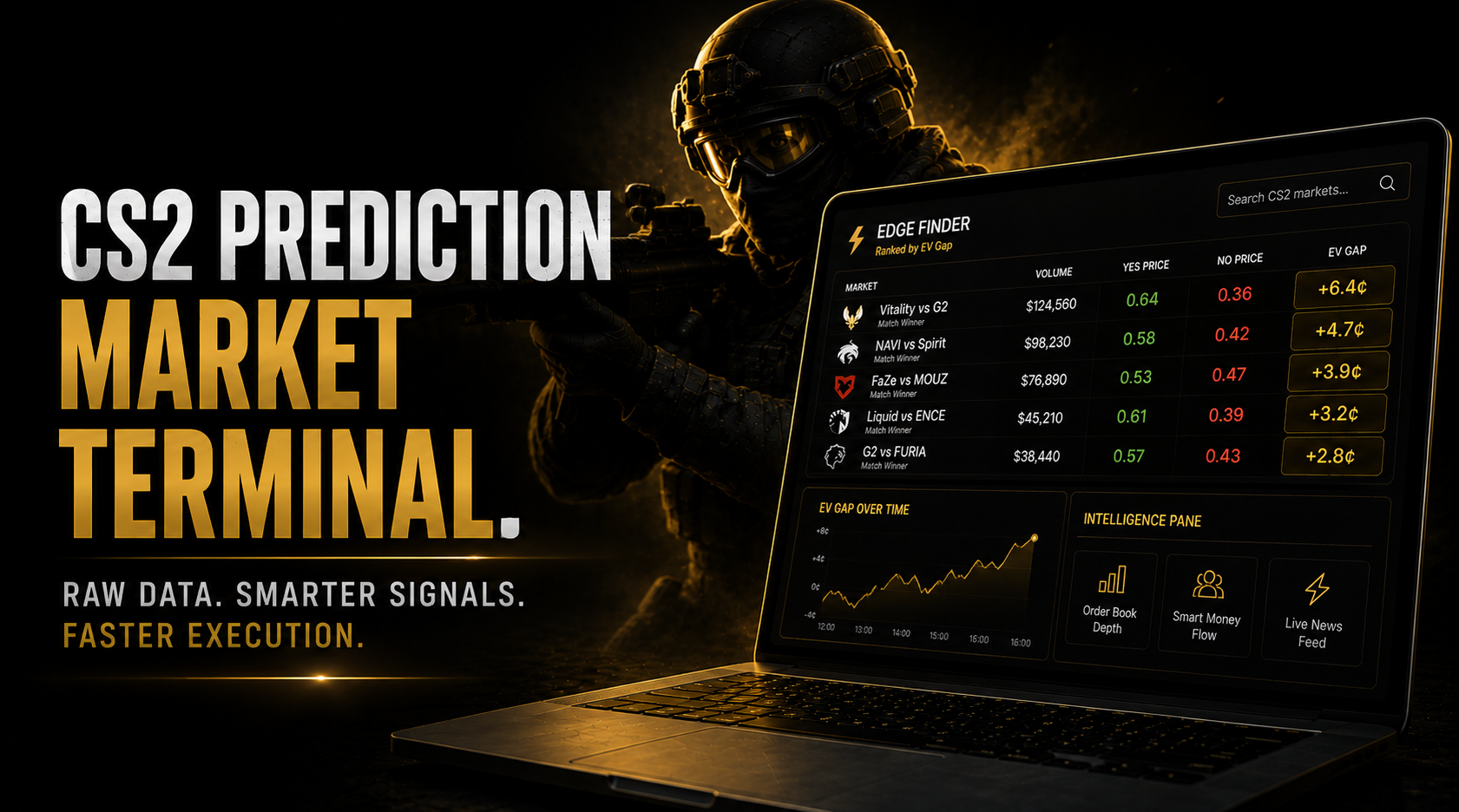
DG3 CS2 Prediction Market Terminal: Everything Raw Polymarket Doesn’t Give You
You can trade CS2 prediction markets on Polymarket’s native interface. The platform works. The contracts resolve correctly. Your positions settle on-chain.
What it doesn’t do is tell you which of the 20 active CS2 markets has the most edge right now. It doesn’t show you whether the CLV-qualified wallets on your selected market are positioned with you or against you. It doesn’t tell you the order book depth before you commit to a position size. And when a stand-in drops with 14 minutes left in the edge window, it doesn’t compress your execution to under 2 seconds.
DG3 CS2 prediction market trading isn’t a different venue. It’s Polymarket with those gaps closed.
Table of Contents
Three Problems the DG3 CS2 Prediction Market Terminal Solves
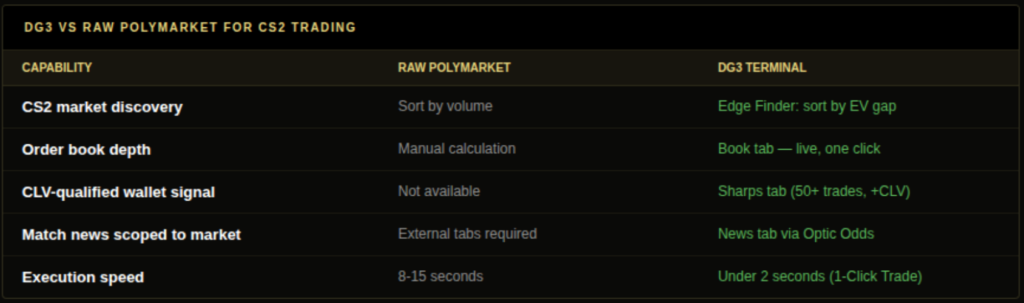
Problem 1: Discovery. Raw Polymarket sorts active CS2 markets by volume. Volume doesn’t predict edge, it predicts activity. The highest-volume markets are typically the best-priced markets, because more capital has flowed through them and more participants have worked to close any gaps. If you want to find where the most edge is right now, sorting by volume is approximately the wrong approach. DG3’s Edge Finder sorts by EV gap instead.
Problem 2: Signal context. You’ve found a CS2 market with a notable EV gap. Before sizing, you need three pieces of information: the current order book depth (can your intended position size fill at the quoted price?), CLV-qualified wallet activity (are the smart wallets positioned the same direction as your model says to trade?), and recent news (is there something you’re not aware of that explains the pricing?). Getting all three from raw Polymarket requires four separate tabs, manual calculations, and an on-chain analytics site. DG3’s Intelligence Pane surfaces all three in one view for the selected market.
Problem 3: Execution speed. A CS2 stand-in announcement creates a 12-25 minute edge window. On raw Polymarket, going from “I want to buy this outcome at this price” to a submitted order requires 8-12 steps on the native interface, taking 8-15 seconds at full proficiency. DG3’s 1-Click Trade compresses that to under 2 seconds. In a 14-minute window, the difference between 2 seconds and 12 seconds of execution friction is 10 seconds of additional window exposure on every position.
The Edge Finder: CS2 Market Discovery Done Right
DG3’s Edge Finder processes every active CS2 Polymarket market against the Pinnacle Signal no-vig benchmark continuously. The output is a ranked list where position one is always the active CS2 market with the largest current gap between what Polymarket prices the outcome at and what the sharpest available sportsbook reference says it should be priced at.
The EV chip on each row shows this gap in cents. That’s the core of the dg3 cs2 prediction market terminal discovery layer. When a stand-in announcement drops and a CS2 match winner market reprices on Polymarket, the affected market rises in the ranking because Polymarket lags the Pinnacle adjustment. The Edge Finder makes that lag visible before it closes.
For DG3 CS2 prediction market traders, the Edge Finder is most valuable in three specific windows:
Stand-in announcement window (highest urgency). The EV chip widens as Polymarket begins repricing but hasn’t fully caught up to the Pinnacle Signal level. The market rises to the top of the ranking. Type the team name in the search field, results sort by EV gap, not volume, so the market with the most current edge surfaces first regardless of how much historical activity it has.
Map veto completion. When the map veto is published before a match, map-specific win rate information becomes relevant to the match winner probability. If your model suggests strong map pool favourability for one team that the market hasn’t fully priced, the EV chip shows the gap.
Early outright market opening. When a major opens new outright markets with thin initial liquidity, the pricing often diverges from the Pinnacle equivalent by more than at peak match depth. These gaps appear in the Edge Finder ranking as they open.
DG3 CS2 Prediction Market Intelligence Pane: Six Use Cases
The Intelligence Pane opens alongside any selected CS2 market. Five tabs, each solving a specific research problem in the DG3 CS2 prediction market workflow.
Book tab, before every position above $200. Live order book depth at the current price, spread, and mid-price updating in real time. CS2 markets outside major fixtures routinely carry spreads of 8-15 cents and limited depth at any given price level. A $500 market order on a $15,000 volume CS2 market can fill 4-5 cents worse than the quoted price. Checking the Book tab before any position above $200 takes 10 seconds and prevents slippage that regularly exceeds the edge being traded.
Sharps tab, before any notable position. CLV-qualified wallet entries scoped to the specific CS2 market you’re viewing. The qualification threshold is 50+ resolved trades and positive 90-day rolling CLV. This filters out the large fan-driven entries that are particularly common in high-profile CS2 matches, entries from wallets with no documented accuracy that look like signal but aren’t. When the Sharps tab shows a large entry from a qualified wallet in the same direction as your model, that’s three-way convergence: your model, the devigged market gap, and documented smart money. The highest-confidence setup in DG3 CS2 prediction market trading.
News tab, before entering any match with recent developments. Match-relevant announcements via Optic Odds, scoped to the selected CS2 market. Stand-in confirmations, injury updates, format changes, and scheduling modifications surface here in real time. In a session where you’re tracking 6-8 active CS2 markets simultaneously, the News tab provides the “is there something I missed?” check without requiring a separate monitoring setup.
Stats tab, before lineup-sensitive positions. Confirmed starting lineups and H2H records as they become available before match start. For CS2 specifically, this is the final verification step on any stand-in signal: confirm the announced change is actually showing in the official lineup before sizing up. Social media announcements are occasionally retracted, postponed, or misreported.
Trades tab, for understanding recent flow. Recent order fills on the selected CS2 market. Useful for distinguishing whether a price velocity event reflects a single large order from one wallet or a series of smaller entries from multiple participants. Multiple simultaneous entries from different wallets is a stronger signal of broadly-distributed new information than one large order.
Also read: Best Prediction Market Tools in 2026 (Ranked by What They Actually Do)
1-Click Trade: The Execution Advantage in Numbers
The DG3 CS2 prediction market 1-Click Trade workflow: see the market in the Edge Finder, click the outcome chip, Trade Desk pre-fills with the current price (refreshed to under 10 seconds old), confirm size, click Buy. Decision to submitted order: under 2 seconds.
The raw Polymarket workflow: find the market in the list (sort by volume, scroll), click into it, click the outcome, open the order form, enter dollar amount, check current price, confirm, click Buy, confirm in MetaMask. Eight to twelve steps, 8-15 seconds at full proficiency.
On a 14-minute stand-in window:
- DG3: 2 seconds = 0.24% of the window used on execution friction
- Raw Polymarket: 12 seconds = 1.43% of the window used on execution friction
The absolute difference is 10 seconds. The practical difference is that those 10 seconds often represent the difference between entering at 0.58 and entering at 0.59 on a fast-moving market. Across 50 stand-in positions per year, 10 extra seconds of friction per position at 0.5-cent average price drag equals approximately $250-$500 in aggregate execution cost on $10,000 of annual CS2 position volume.
DG3 CS2 Prediction Market Terminal: Phase 0 Coverage and Phase 2 Roadmap
For new DG3 users, understanding what Phase 0 covers and what it doesn’t prevents misaligned expectations. Phase 0 is fully operational on Polymarket’s complete CS2 market catalogue. The infrastructure, execution, and intelligence suite are complete for that venue. Phase 2+ expansion is on the product roadmap, and its scope is relevant for traders thinking about where cross-platform CS2 arbitrage fits into their workflow.
DG3’s current Phase 0 covers Polymarket only. Your wallet, USDC, and position history stay on Polymarket. DG3 adds the Edge Finder, Intelligence Pane, and 1-Click Trade above it.
Phase 2+ roadmap includes expansion beyond Polymarket to additional venues. For DG3 CS2 prediction market traders, this means future cross-platform EV comparison, the Edge Finder would surface CS2 price discrepancies between Polymarket and other venues automatically, rather than requiring the manual Polymarket-vs-Kalshi devig process that currently fills that gap.
The cross-platform comparison matters specifically because Kalshi is the only regulated US-accessible CS2 prediction market option. Phase 2+ would bring that comparison into the terminal infrastructure rather than leaving it as a separate manual workflow.
For the current period, Polymarket remains the deepest CS2 prediction market venue by volume, with Kalshi as the primary regulated US alternative, and DG3’s Phase 0 infrastructure covers the full workflow for that venue.
Practical DG3 CS2 Prediction Market Session Structure
Understanding the terminal helps. Knowing how to structure a DG3 CS2 prediction market trading session around its features is where the improvement actually shows up.
Before the match window (30-45 minutes prior):
- Run your HLTV model on the day’s scheduled matches. Produce independent probability estimates for each fixture. Write them down before opening DG3.
- Check your stand-in scenario library against the announced lineups for the day.
- Open DG3 Edge Finder. Identify which of the day’s CS2 markets currently show the largest EV gap. Note any that align with your model’s directional view.
During the match window (actively monitoring):
- Keep the Edge Finder open. Any market that rises sharply in the ranking during the window signals new information absorption before the announcement has propagated broadly.
- For any market you’re considering entering, open the Intelligence Pane. Check Book tab (depth), Sharps tab (CLV-qualified entries), News tab (any recent announcements).
- On stand-in alerts: confirm via Stats tab that the lineup change is reflected before entering. Size based on edge gap and Book depth.
After the session:
- Record entry prices for all positions taken.
- After resolution, retrieve closing prices and calculate CLV for each position.
- Update your calibration sheet. Note which signals produced the best entries and which produced the weakest.
This structure takes 15 minutes of preparation and 5 minutes of post-session record-keeping. Over a full major cycle, the calibration record it builds tells you more about your CS2 edge than any amount of theoretical model discussion.
The Most Common DG3 CS2 Prediction Market Workflow Error
The most consistently observed error among new DG3 CS2 prediction market users: sorting the Edge Finder by EV gap and treating the top-ranked market as an automatic buy.
The EV chip shows the gap between devigged Polymarket and the Pinnacle Signal benchmark. A 10-cent gap means Polymarket is 10 cents below Pinnacle’s devigged price, which is a genuine signal of potential mispricing. But it doesn’t mean the position has 10 cents of edge after fees. It means one of three things:
Polymarket is behind Pinnacle’s pricing of new information, and the gap will close as Polymarket catches up. This is the tradeable case.
Pinnacle is wrong for this specific market, and Polymarket is correctly priced. This happens on T2 fixtures where Pinnacle’s research depth is lower.
The resolution criteria between Polymarket and the Pinnacle reference differ in a way that creates an apparent but non-tradeable gap.
The dg3 cs2 prediction market terminal surfaces the gap. Your model determines whether it’s real. The three-step process: see the EV chip, run your independent model estimate, compare your model’s output against the Pinnacle devigged price and the Polymarket devigged price. If your model agrees with the directional read, you have three-way convergence. If your model disagrees with the gap direction, the EV chip is showing you something that warrants investigation, not an automatic entry.
Frequently Asked Questions
Q: What does DG3 CS2 prediction market terminal add for traders over raw Polymarket? A: Three distinct layers. Edge Finder ranks all active CS2 Polymarket markets by EV gap against the Pinnacle Signal benchmark in real time, solving the market discovery problem that volume-sorted Polymarket lists don’t address. Intelligence Pane provides live order book depth in the Book tab, CLV-qualified wallet entries in the Sharps tab (50+ resolved trades, positive 90-day rolling CLV), match news in the News tab via Optic Odds, and confirmed lineups in the Stats tab, all for the selected market in one view. And 1-Click Trade executes from Edge Finder chip to submitted order in under 2 seconds, versus 8-15 seconds on the native Polymarket workflow. All positions still settle on Polymarket. Your wallet and USDC remain on Polymarket. DG3 is the layer above it. Edge Finder ranks all active CS2 Polymarket markets by EV gap against the Pinnacle Signal benchmark in real time (discovery), Intelligence Pane shows live order book depth, CLV-qualified Sharps entries, News tab announcements, and Stats tab lineups for the selected market (signal context), and 1-Click Trade executes from Edge Finder chip to submitted order in under 2 seconds (execution speed).
Q: How does DG3 surface CS2 stand-in signals? A: When a stand-in announcement causes Polymarket to lag Pinnacle’s repricing, the affected CS2 market rises in the Edge Finder ranking as the EV chip widens. The News tab via Optic Odds surfaces the announcement scoped to the open market. The Stats tab confirms the official lineup as match start approaches.
Q: Does DG3 cover CS2 markets on Kalshi? A: No. DG3’s current Phase 0 covers Polymarket only. The Pinnacle Signal benchmark is an external reference, not a Kalshi comparison. Phase 2+ roadmap includes expansion to additional venues, which would add cross-platform CS2 comparison to the Edge Finder.
Q: How does the Sharps tab filter CS2 wallet entries? A: The Sharps tab shows only entries from wallets with 50+ resolved trades and positive 90-day rolling CLV, scoped to the specific CS2 market you’re viewing. Unqualified large orders, common in high-profile CS2 fixtures from fan-driven capital, don’t appear. This filter ensures every entry flagged carries a documented track record of finding edge before the market.
Q: Is the DG3 CS2 prediction market terminal different from Polymarket itself? A: No. DG3 is a terminal layer built on top of Polymarket. Your wallet, USDC, positions, and transaction history remain on Polymarket. DG3 adds the research and execution infrastructure above it. Every position taken through DG3 settles on the Polymarket CLOB. This means your entire position history and CLV track record accumulates on Polymarket regardless of whether you accessed markets through DG3 or native Polymarket. DG3 is a terminal layer built on top of Polymarket. Your wallet, USDC, positions, and transaction history remain on Polymarket. DG3 adds the research and execution infrastructure above it, Edge Finder, Intelligence Pane, 1-Click Trade, without changing where your trades settle.
Also read: Is Polymarket the Best Platform for CS2 Esports Betting in 2026
Bloomberg, Nansen, DG3: The Bloomberg Alternative for Prediction Markets
CS2 Odds Comparison Tool: How to Find the Best Line Across Prediction Markets